- Decision
A single-page checkout with collapsible sections.
- Why
- Each page change on 3G cost two to six seconds and another chance to quit. One page with Contact, Delivery and Payment sections keeps the total and the Pay button in reach the whole time, even with the keyboard open.
- Trade-off
- A longer page and more state to manage; the order summary moved into a strip that expands at the top.
- Risk watched
- Shoppers missing a required field above the fold. Watched through errors per section; the first unfinished section always opens and scrolls into view.
- Owner
- Me, with the PM and the mobile web lead
Mobile checkout and merchant tools
Shoppers gave up on a four-page desktop checkout, and merchants couldn’t tell where their money was. I redesigned both for one thumb and a 3G connection.
Impact
Mobile checkout completion
Mobile checkout completion: from 61% to 72%
Mobile shoppers who start checkout, 2018 vs 2020
Payout setup completion
Payout setup completion: from 58% to 74%
New merchants, within 14 days of sign-up
“Where’s my money?” tickets
“Where’s my money?” tickets: −22%, 3 mo vs 3 mo
Monthly average, 3 months before vs after
General notes6-minute sheet
The 60-second version
- Checkout lost four in ten mobile shoppers, and payout questions were our biggest support cost.
- I designed a one-page checkout with sections that fold away, and a payout timeline that dates every step.
- Every screen was built for low-end Android on 3G first.
- Checkout completion rose from 61% to 72%, payout setup from 58% to 74%; money tickets fell 22%.
Challenge
Existing conditions
“I paid on Monday and it’s Thursday, so where is my money?” was the most common line in our support inbox.
Most of our shoppers were on mid-range Android phones over mobile data, facing a four-page checkout built for desktop. The keyboard hid the Continue button on two of the four pages, and every page was a fresh round trip. On the merchant side, payouts went quiet for up to five days.
Scope of work
My role
I led…
- Ran 14 checkout sessions with shoppers on their own phones and 9 merchant interviews
- Designed the one-page checkout, the payout setup flow and the payout timeline
- Prototyped every release and usability-tested it before and after launch
- Wrote the payout status messages and help articles with the support lead
- Set up ticket tagging by reason, so we could measure what changed
The team…
- A second designer owned the merchant web dashboard and our shared component kit
- The PM set the scope of each release and ran the A/B rollout for checkout
- Five engineers built Android, iOS, mobile web and the payout events behind the timeline
- 2 × Product designers
- 1 × Product manager
- 5 × Engineers
Constraints
What we had to work within
- Low-end Android phones with 1–2 GB of RAM
- 3G networks and dropped connections
- Identity checks before a merchant’s first payout
- One design for Android, iOS and mobile web
- No new support headcount
Principles
What we held to
P1
One thumb, one decision per screen.
Primary actions sit in the lower half of the screen, and each section asks for one thing. Two-handed steps get redesigned.
P2
Tell merchants where their money is before they ask.
Every payout carries a status, a date and a next step. A silent wait turns into a support ticket.
P3
Design for the slowest network first.
We tested on a five-year-old Android over throttled 3G. Every action survives a dropped connection, and nothing a merchant enters is lost.
Decision log
Decisions
- Decision
A payout status timeline.
- Why
- Merchants weren’t worried about fees; they were worried about silence. Three dated steps — Order paid, In transit, Deposited — answer the question before it becomes a ticket.
- Trade-off
- Payments had to expose settlement events we had never shown, and every date had to stay honest when a bank was slow.
- Risk watched
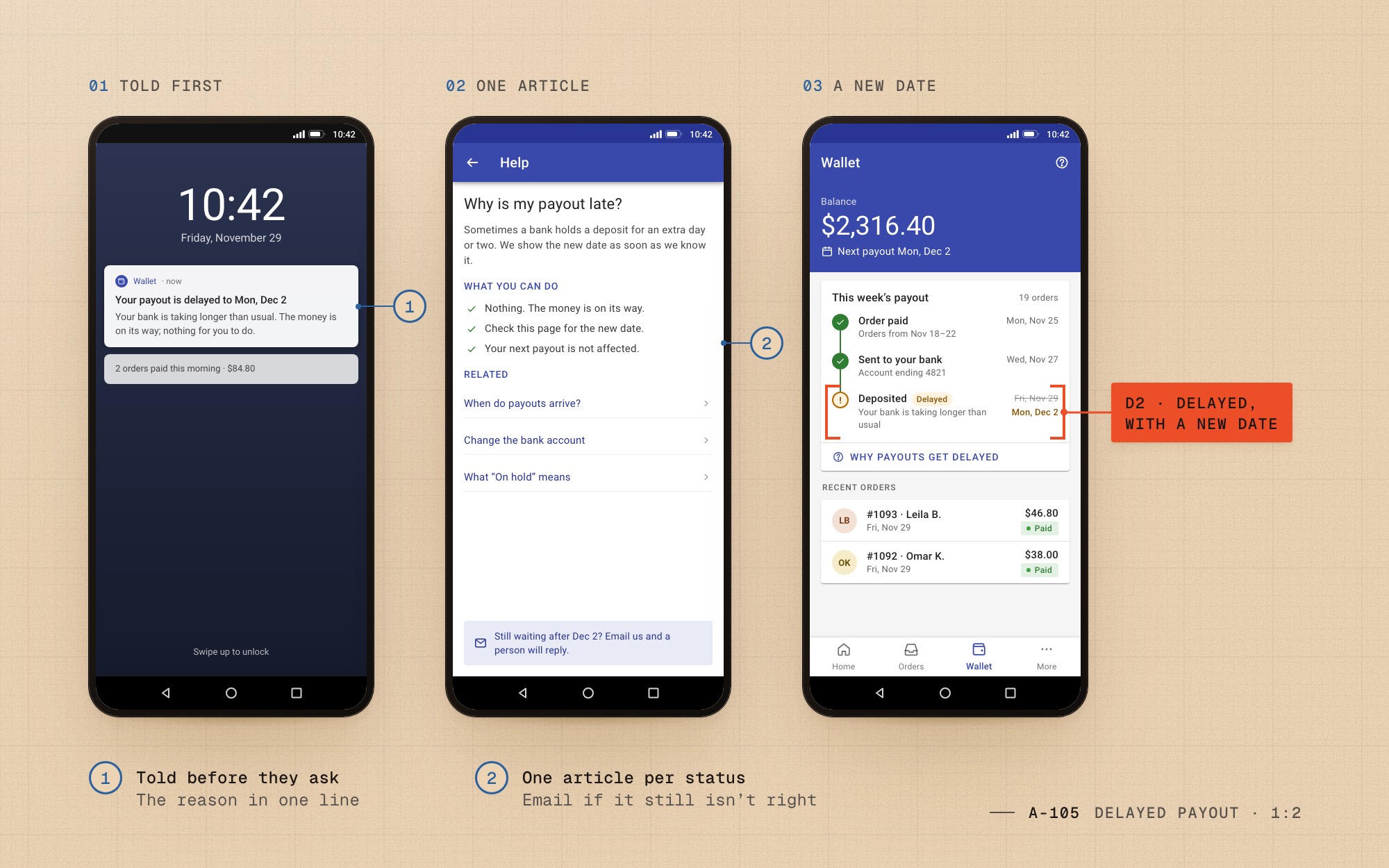
- A missed date erodes trust faster than no date. When a deposit slips, the step turns to Delayed, with the new date and the reason.
- Owner
- Me, with the payments engineers and the support lead
- Decision
In-app chat support.
- Why
- Merchants asked for chat, but most chats would have been the same question: where is my money? Answering it on the screen was cheaper than answering it in a queue.
- Trade-off
- Replaced by the status timeline and twelve short help articles linked from each status; merchants with a real problem still had email.
- Risk watched
- Merchants feeling they couldn’t reach a person. Watched through satisfaction scores on payout tickets and email volume; neither got worse.
- Owner
- The PM and me, with the support lead
- Decision
Offline-tolerant states: skeletons, retry and queued actions.
- Why
- On 3G a blank screen looked like a crash, and a failed upload looked like a lost payout. Skeletons show the shape of what’s coming; actions taken on a weak signal queue and send when it returns.
- Trade-off
- Every screen needed three extra states, and a rule for what may never queue: paying always waits for a live connection, and says so.
- Risk watched
- Double submissions. Every queued action carries a one-time key, and the Pay button locks with a visible Processing state.
- Owner
- Me, with the Android lead
Checkout
Four pages became one
I sat with 14 shoppers on their own phones, most of them mid-range Android on mobile data. Every page of the old checkout was a fresh load, and on two of the four the keyboard covered Continue.
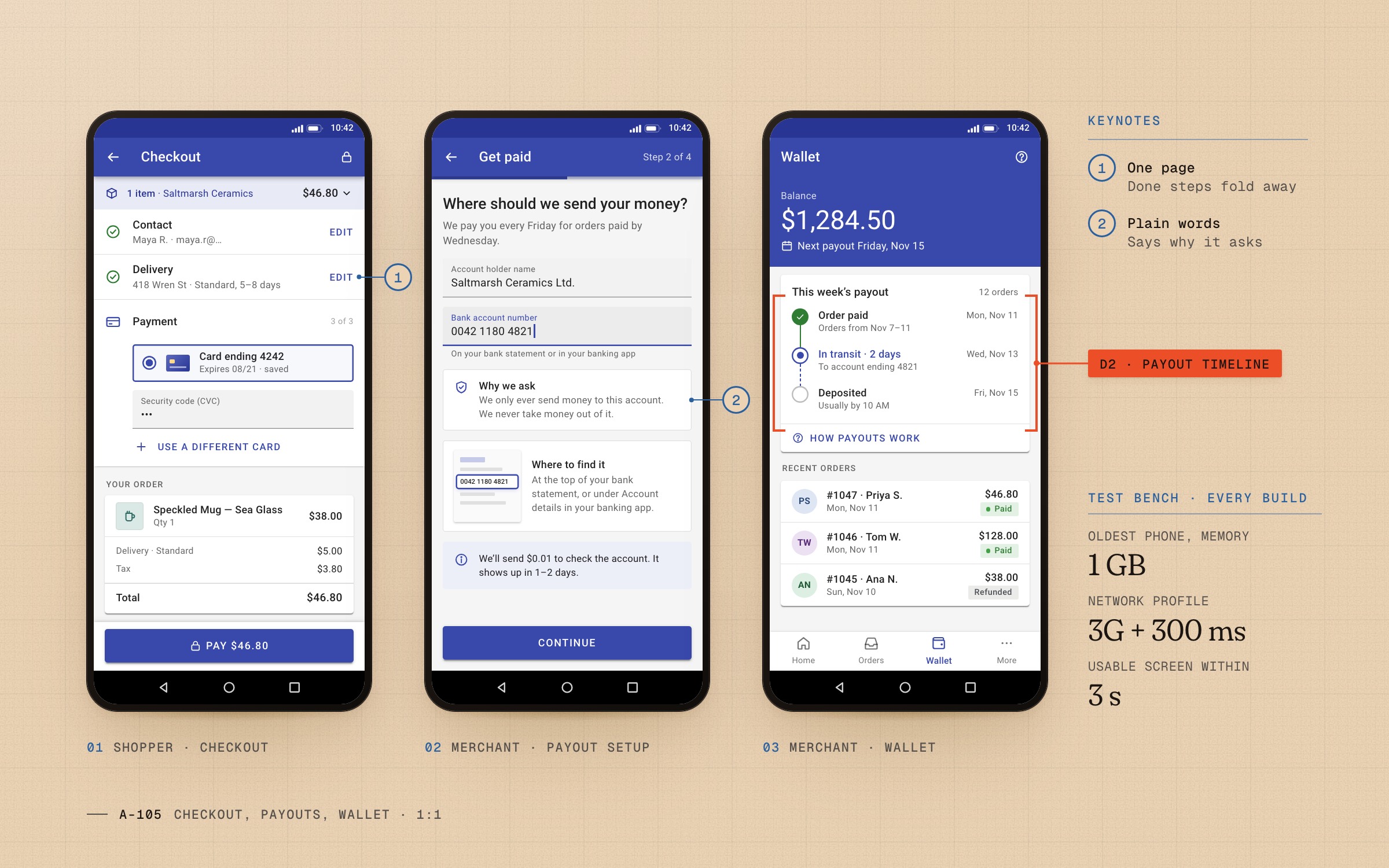
The new checkout is one page: Contact, Delivery and Payment as sections that fold to a single line once they’re done, with the total and the Pay button always in reach.
| Measure | Four pages, 2018 | One page, 2019 |
|---|---|---|
| Page loads to pay | 4 | 1 |
| Time to a usable screen | 6.8 s | 2.4 s |
| Taps to pay | 14 | 5 |
| Fields typed | 9 | 1 (CVC) |
| Pay visible with the keyboard open | No | Yes |
Our test bench: a five-year-old Android phone with 1 GB of RAM on a 3G profile with 300 ms of added latency, the same one-item cart and a returning shopper.
Fig. 01 D1Same cart, same five-year-old phone on throttled 3G: four page loads became one, and 14 taps became 5.
Payout setup
Four steps to the first Friday
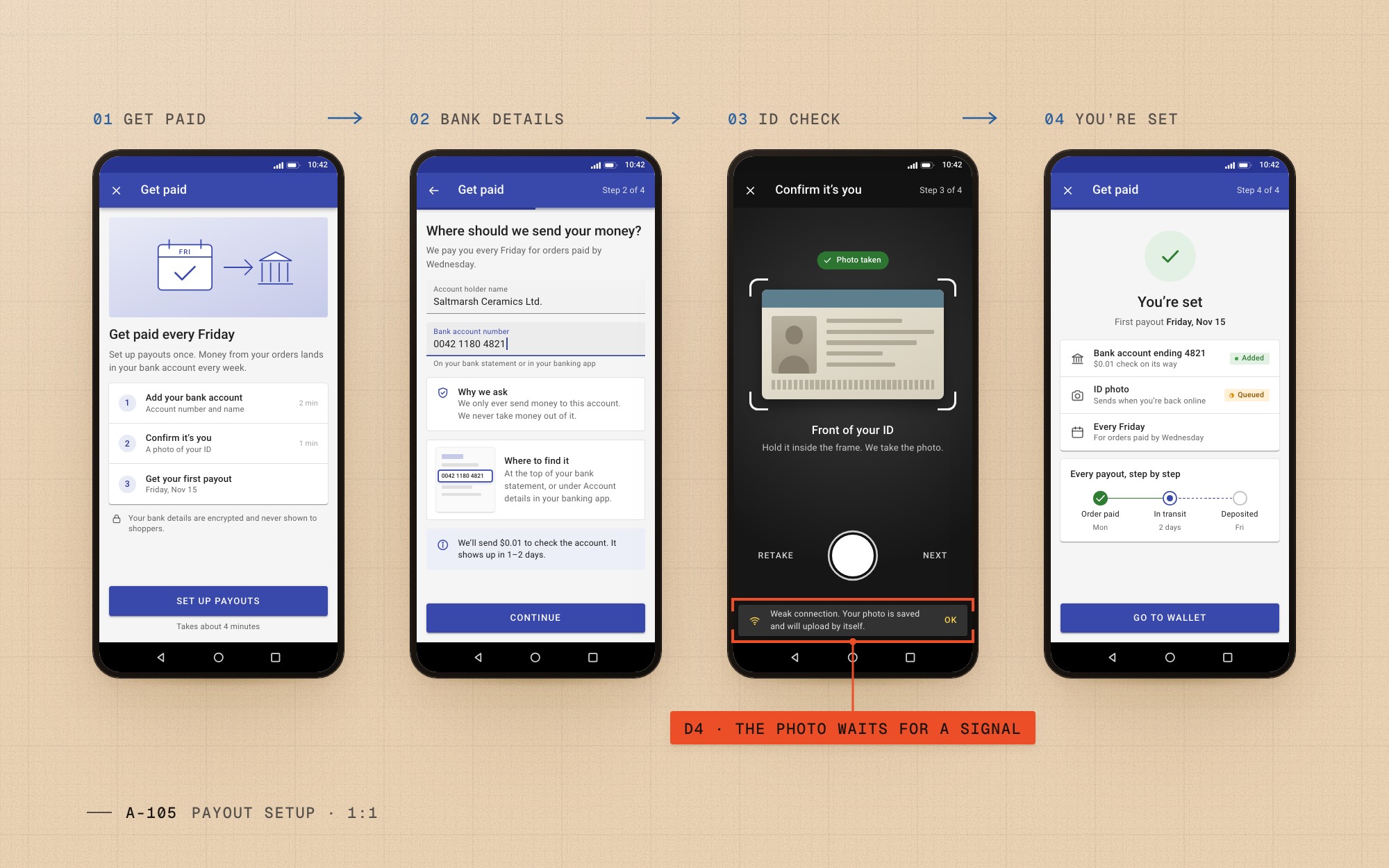
Four in ten new merchants never finished payout setup. The old form asked for bank and identity details without saying why, and one failed upload meant starting again.
I rebuilt it as four screens, each with one job and a plain sentence on why we ask. On a weak connection the ID photo is saved on the phone and sends itself later.
Payout timeline
Where’s my money, answered
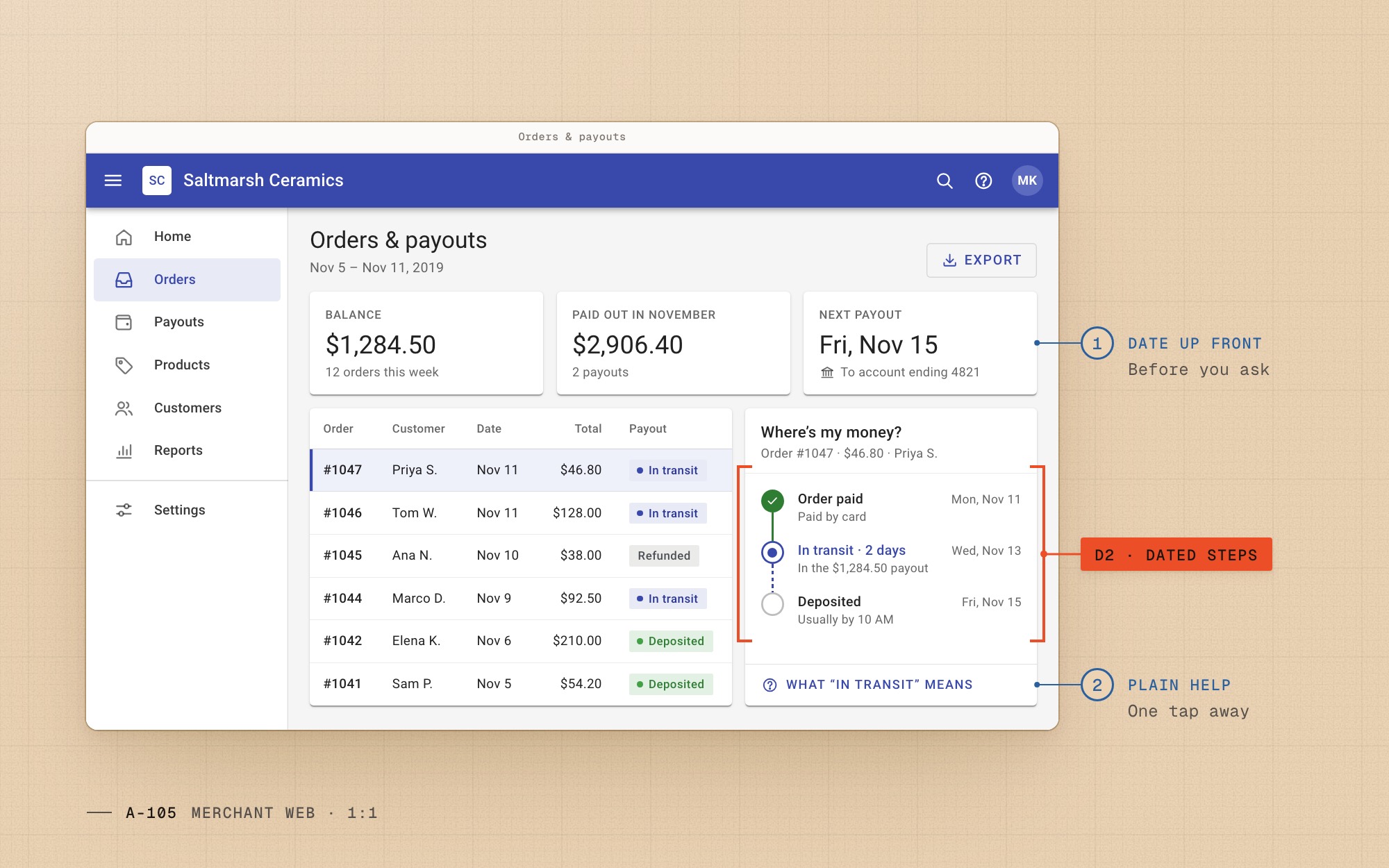
“Where’s my money?” was our largest support reason. Payouts went quiet for up to five days, so merchants assumed the worst.
Every payout now moves through three dated steps, in the app and on the merchant web. When a bank is slow, the step says Delayed, with the new date and the reason.
Support
The chat we didn’t build
Merchants asked for in-app chat, and it was on the roadmap. But most of those chats would have asked the question the timeline now answers on the screen.
We descoped chat, linked a short help article from every payout status and tagged tickets by reason, so we could see exactly what changed.
Fig. 04 D3Support contacts by reason, before and after the timeline. Money questions fell 22%; refunds and log-ins didn’t move.
Before / after
A single-page checkout with collapsible sections.


Key screens
Key screens
01 / 03
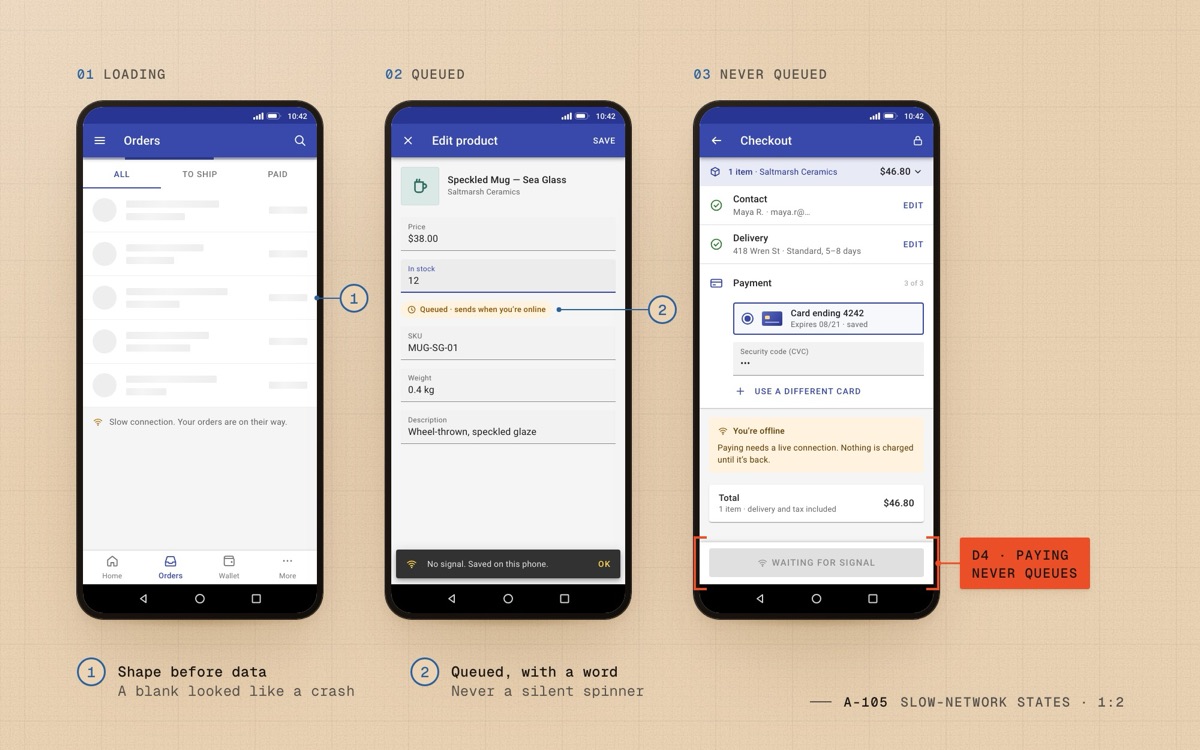
Fig. 06 D4Skeletons while it loads, edits that queue with a word, and a Pay button that never queues. 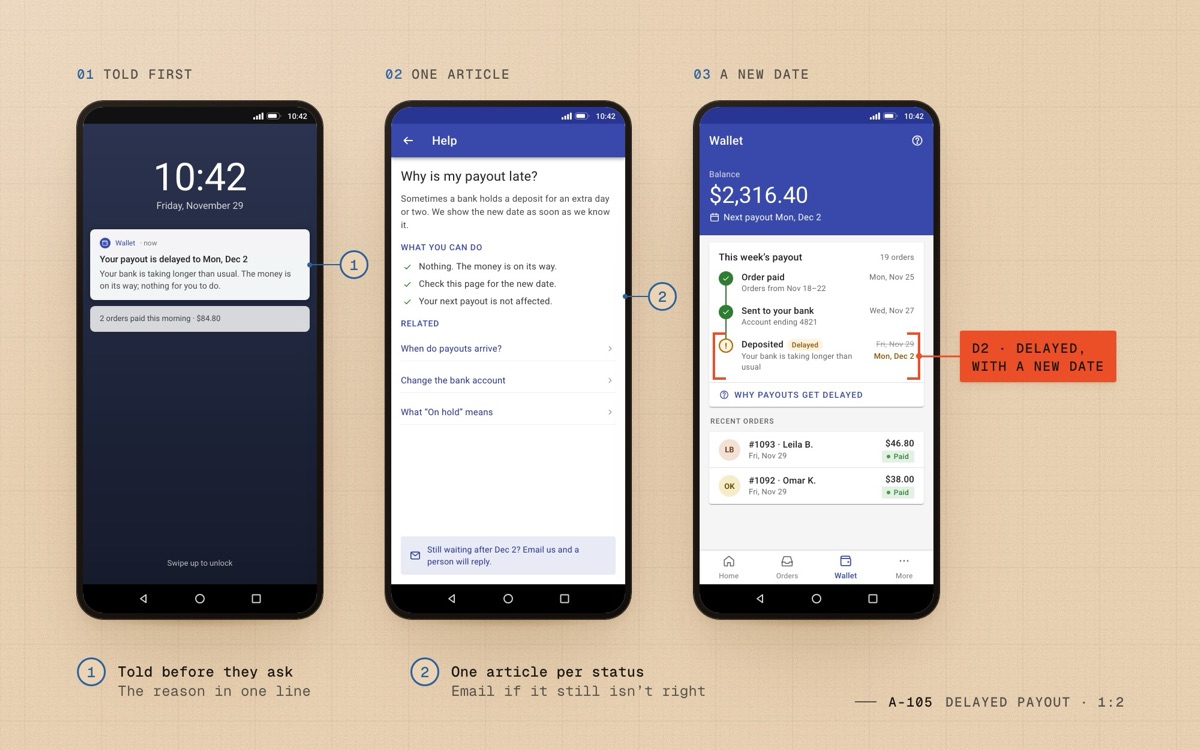
Fig. 07 D2When a bank is slow: told first, one article for the status, and the new date on the timeline. 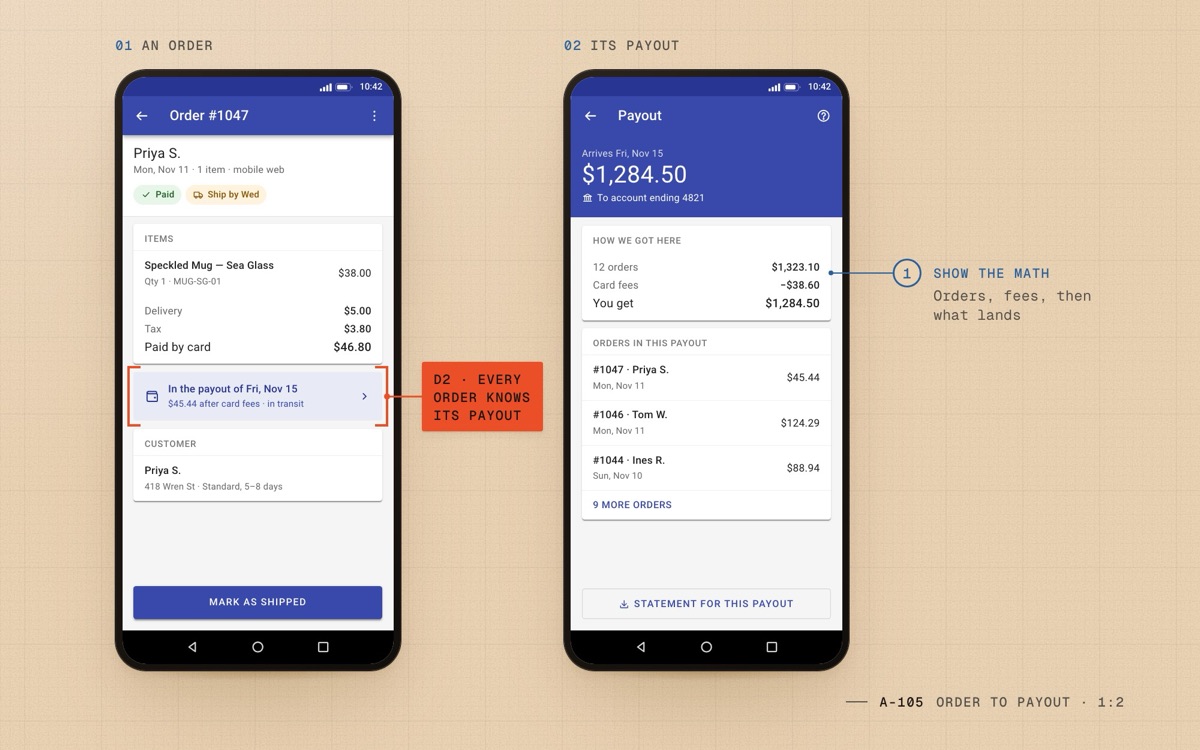
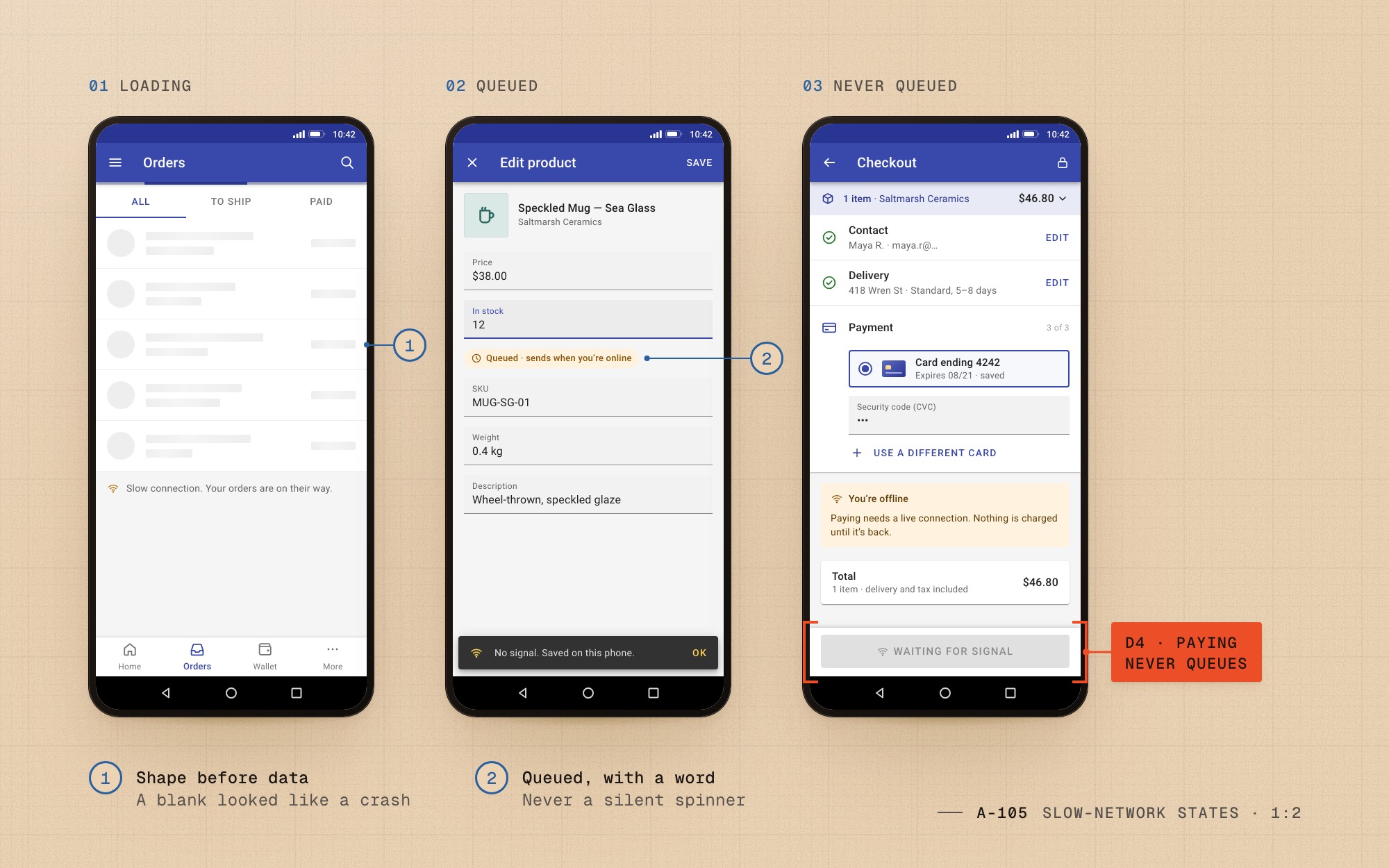
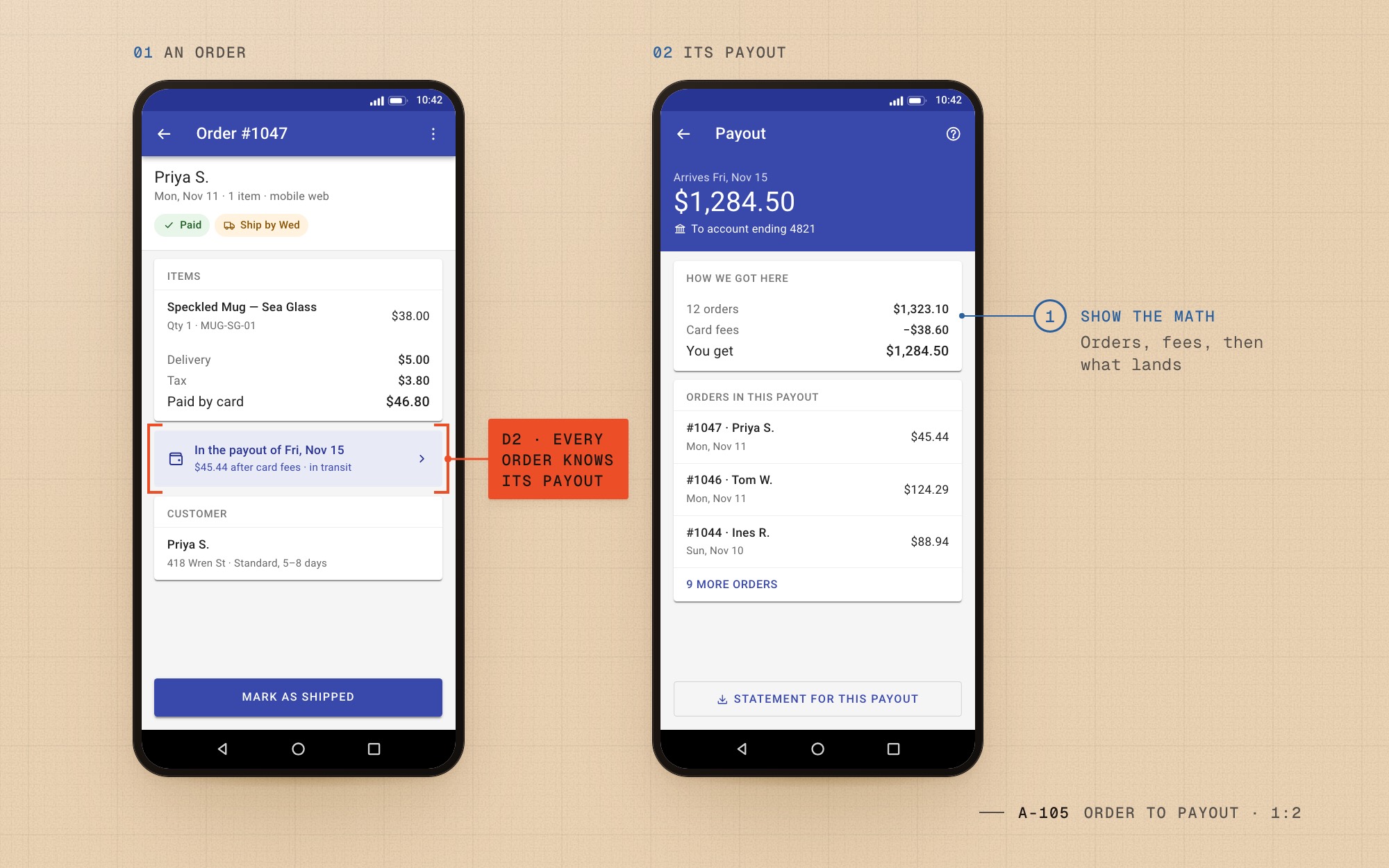
Fig. 08 D2Every order shows the payout it lands in, and every payout shows its math.
Design system
A small mobile system, 2019
One Material-based kit shared by Android, iOS and mobile web: a single accent, status colours that always come with a word, and states for slow networks.
- #3949AB
accentPrimary actions, app bar, current step - #283593
accent-darkStatus bar and text on tinted surfaces - #2E7D32
successCompleted steps and Paid - #8A5300
warningDelayed and Queued, always with a word - #F5F5F5
surfaceApp background behind white cards
| Role | Spec | Rendered |
|---|---|---|
| App bar | Roboto 500 · 20/28 | Checkout |
| Amount | Roboto 400 · 38/46 | $1,284.50 |
| Body | Roboto 400 · 14/20 | We pay you every Friday for orders paid by Wednesday. |
| Button | Roboto 500 · 14, caps | Pay $46.80 |
Components
- Collapsible checkout section
- Sticky pay bar
- Payout timeline
- Queued-action snackbar
- Skeleton row
Outcomes
After launch
- Launch
2020
- +2 weeks
Checkout completion 61% → 68%
One-page checkout live for every mobile shopper after a two-week A/B test
- +3 months
Payout setup 58% → 74%
Payout setup in four steps, with ID photos that queue on a weak signal
- +6 months
Checkout 72% · money tickets −22%
Payout timeline in the app and on the merchant web
Learnings
Revisions
Paths not taken
- A native-only checkout. Faster to polish, but a third of our shoppers arrived through links shared in social posts and never installed an app.
- In-app chat for payout questions. It would have answered the same question one merchant at a time, in a queue, instead of once on the screen.
- The payout schedule on a settings page. Accurate, but nobody opens settings until something has already gone wrong.
Two reflections
- Testing on a five-year-old Android over a throttled connection taught me more than any design review. I still ask for the slowest phone in the room before the newest one.
- I underestimated how much of payouts was copy. The timeline only cut tickets once every status had a date and a plain sentence; support and I rewrote the delay messages three times.
Go deeper
Details
Detail 1How we tested on slow networks
Every build ran on a bench of three phones: a five-year-old Android with 1 GB of RAM, a mid-range Android and an older iPhone, all on a 3G profile with 300 ms of added latency.
A screen passed only if it was usable in under three seconds and every action survived pulling the connection mid-tap.
Detail 2Payout statuses and their words
Five statuses, each with a date and one sentence: Order paid, In transit, Deposited, Delayed and On hold. Delayed always names the new date and the reason; On hold always names what the merchant can do.
Support wrote the first drafts with me, so the words in the app matched the words in their replies.
Detail 3What can wait for a signal, and what can’t
Cart edits, saved items and payout setup steps queue on a weak signal and send when it returns. Paying never queues: the Pay button waits for a live connection and says so.
Every queued action carries a one-time key, so a retry can never charge or submit twice.
NoteMerchant and shopper names changed to protect their privacy.
Continue the set

