- Decision
Delegated caregiver access, scoped, expiring and audited, replaces password-sharing
- Why
- In the diary study, 11 of 15 caregivers signed in with their parent’s password. The clinic could not tell who had agreed to what.
- Trade-off
- Inviting a helper adds two screens, and every permission has to explain itself in one line.
- Risk watched
- Patients granting more than they mean to. Defaults are the narrowest useful set, and visit notes start off.
- Owner
- Me, with the PM and the client’s privacy officer
Virtual care that works for patients, caregivers and clinicians
Fourteen months on a virtual-care platform for patients over 60. Helpers got their own keys, joining became one tap, and intake started speaking plain English.
Impact
No-shows, video visits
No-shows, video visits: −18%, 6 mo vs 6 mo
6 months after launch vs the 6 before
Method: how “No-shows, video visits” was measuredMedian intake time
Median intake time: from 11 to 4 min
First screen to submit, from analytics
Method: how “Median intake time” was measuredUsability score (SUS), patients 60+
Usability score (SUS), patients 60+: from 64 to 83
Two rounds of 12 patients, on their own phones
Method: how “Usability score (SUS), patients 60+” was measured
General notes7-minute sheet
The 60-second version
- Older patients were the platform’s heaviest users, and every missed video visit cost a clinic slot.
- I led design for delegated caregiver access, Today-first booking and one-tap joining with an audio fallback.
- We killed a symptom-checker chatbot and gave that load to clinicians.
- No-shows −18%, intake 11 → 4 min, SUS 64 → 83.
Challenge
Existing conditions
“My daughter books everything, so I just give her my password,” one patient told us in our first round of interviews.
The platform served a network of family practices, and most of its video patients were over 60. Helpers signed in with their parents’ passwords, intake asked for the same history at every visit, and one in five video visits started late or not at all. Each workaround cost the clinic a visit and the patient some dignity.
Scope of work
My role
I led…
- Designed the patient app, caregiver access and the clinician request queue, end to end
- Planned two usability rounds with our researcher: 12 patients aged 60+ each, on their own phones
- Wrote the plain-language standard and rewrote intake with our clinical advisors
- Mapped every flow to WCAG 2.2 AA and reviewed builds with engineering every sprint
- Framed each decision for the client’s medical lead and product owner, trade-offs first
The team…
- Our researcher recruited through the clinics and ran a two-week diary study with 15 caregivers
- A second designer owned the clinician desktop and the shared component library
- Two clinical advisors, a family physician and a nurse, wrote and checked every routing rule
- Six engineers shipped iOS, Android and web from one set of components
- 1 × Senior UX designer (me)
- 1 × Product designer
- 1 × Researcher
- 1 × Product manager
- 6 × Engineers
- 2 × Clinical advisors
Constraints
Privacy and access requirements
- Health-privacy law and clinic consent policy
- Express, revocable consent for every helper
- In-country data residency
- WCAG 2.2 AA
- No automated diagnosis
- Older phones and rural connections
Principles
What we held to
P1
Never make someone prove who they are twice.
A passkey or a one-time email link, a helper’s own sign-in, and intake that remembers. Every repeated question is a chance to give up.
P2
The safest path is the obvious one.
If video is wrong for the problem, the screen says so and offers the next safe step: in person, a nurse line or emergency services.
P3
Plain language is a clinical requirement.
A patient who misreads a question answers it wrongly. Every screen reads at grade 8 or lower (SMOG), and a clinician signs off the words.
Decision log
Decisions
- Decision
Booking leads with Today / Tomorrow / This week, from lead-time data
- Why
- 55% of visits were booked for today or tomorrow, yet booking opened on a month calendar.
- Trade-off
- Patients planning weeks ahead take one extra tap to reach the calendar.
- Risk watched
- Days with no same-day capacity. An empty Today says so and offers a call to the clinic.
- Owner
- Me, with the PM and the clinic schedulers
- Decision
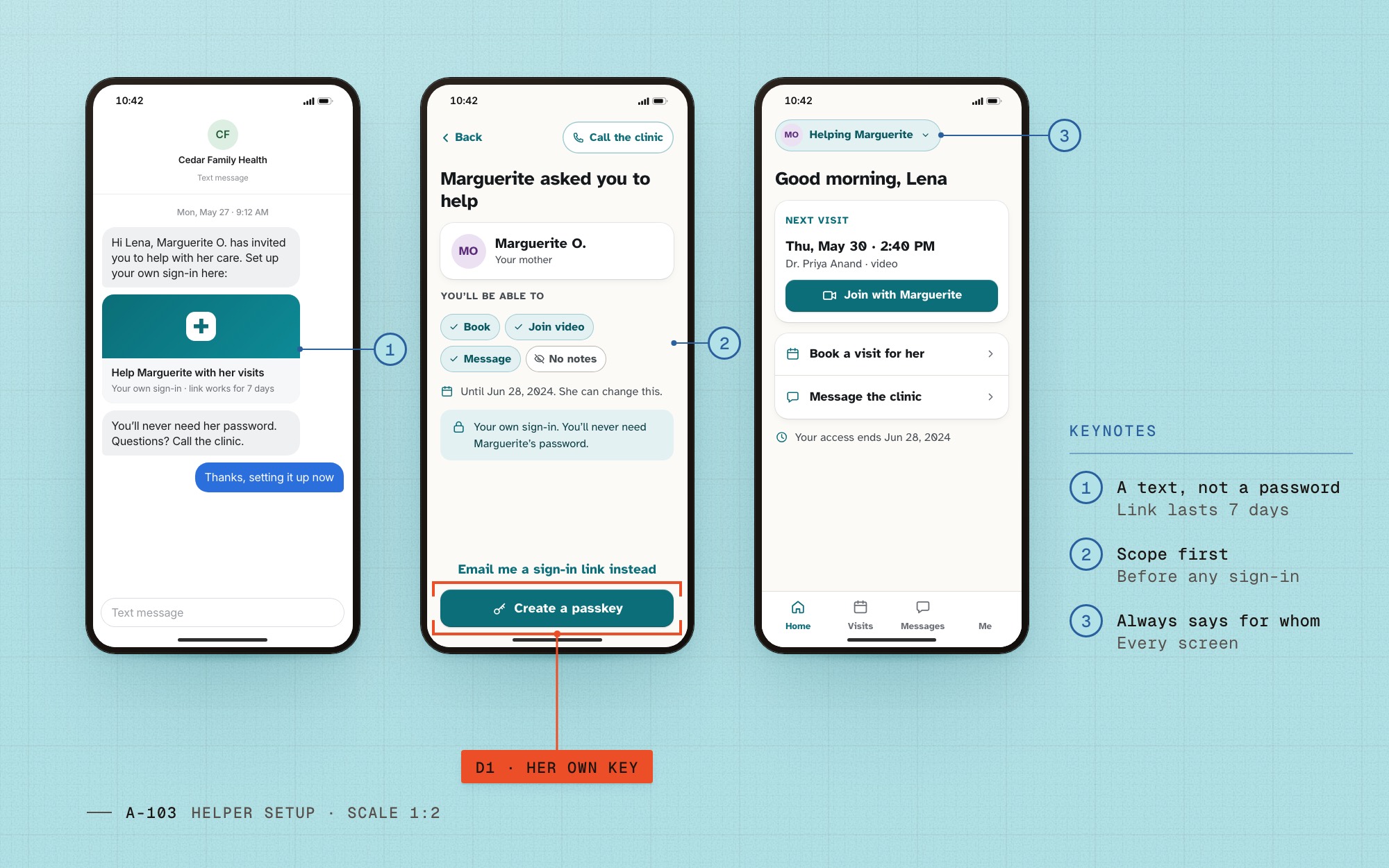
One-tap join with a device check and an audio-only fallback
- Why
- Most late or missed starts came from camera permissions and weak connections.
- Trade-off
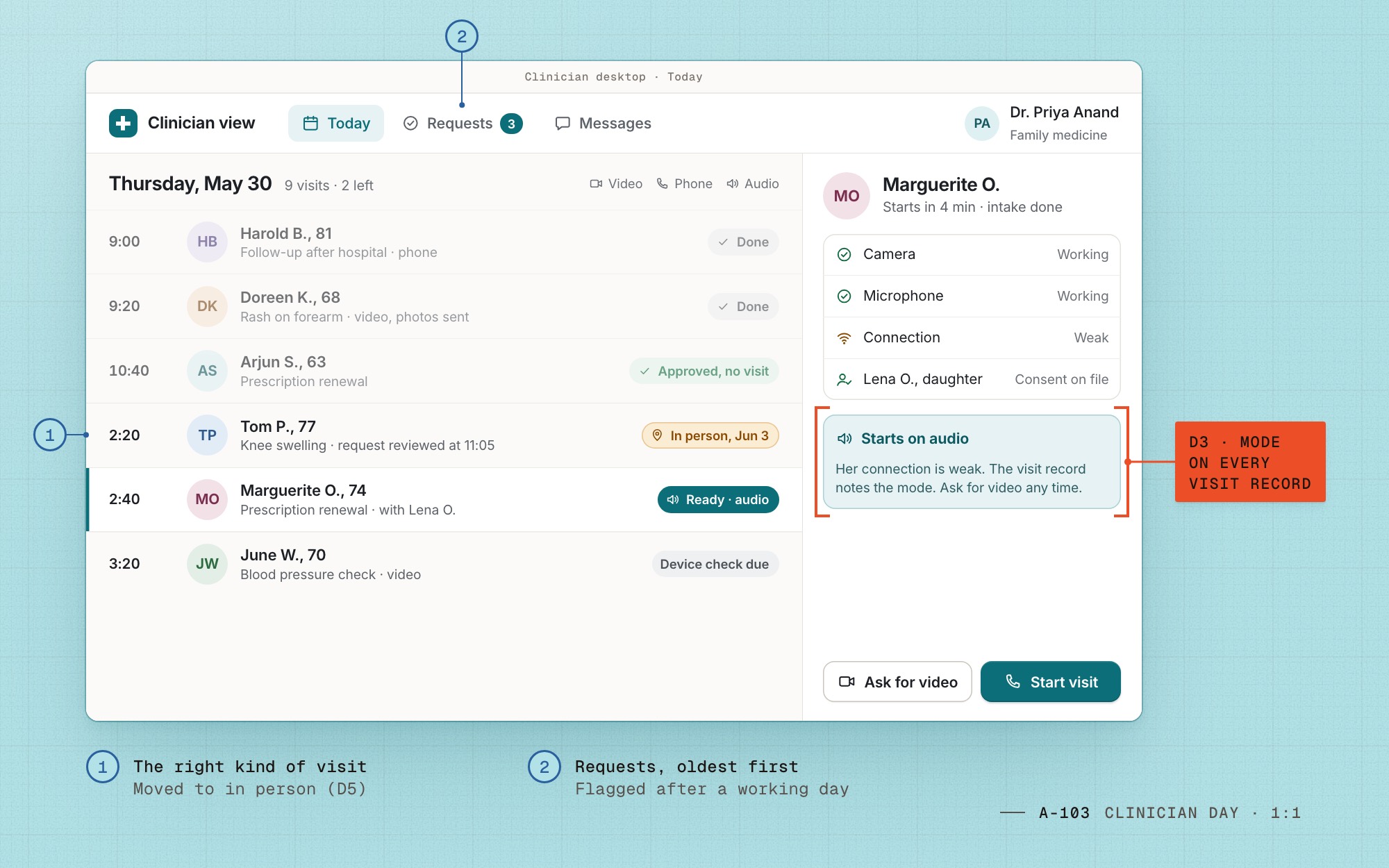
- Some visits begin without video, so the visit record notes the mode.
- Risk watched
- Audio being used where the clinician needs to see the patient. Clinicians can ask for video with one tap.
- Owner
- Me and the mobile engineering lead
- Decision
An appropriateness screen that routes plainly to in-person care, a nurse line or emergency services
- Why
- Some problems should never be a video visit. Patients needed to hear that while booking, before a doctor said it two minutes into a call.
- Trade-off
- Everyone sees one more screen before booking, so it is one question with three plain answers.
- Risk watched
- Under-triage: someone with chest pain booking a video visit anyway. The emergency answer is a full-width call button, the request records the answer chosen, and the clinical advisors reviewed routed cases every month.
- Owner
- Clinical advisors for the content, me for the flow
- Decision
A clinician approval step for prescription renewals
- Why
- About a third of bookings were renewals. A two-minute review settled many of them, or chose the right kind of visit.
- Trade-off
- Patients wait up to one working day for an answer instead of booking straight away.
- Risk watched
- Requests going stale. The queue shows waiting time, and anything older than a day rises to the top.
- Owner
- Me and the second designer, with the clinical advisors
- Decision
A symptom-checker chatbot for triage
- Why
- It was in the original brief. With no automated diagnosis allowed, it could only guess, and a wrong guess here is a safety incident, not a bug.
- Trade-off
- We dropped a feature the client had already promised its board. Triage stayed with people.
- Risk watched
- Clinician workload. The approval step and the appropriateness screen took the load the chatbot was meant to carry.
- Owner
- Me, with the clinical advisors and the client’s medical lead
Caregivers
Give the helper their own key
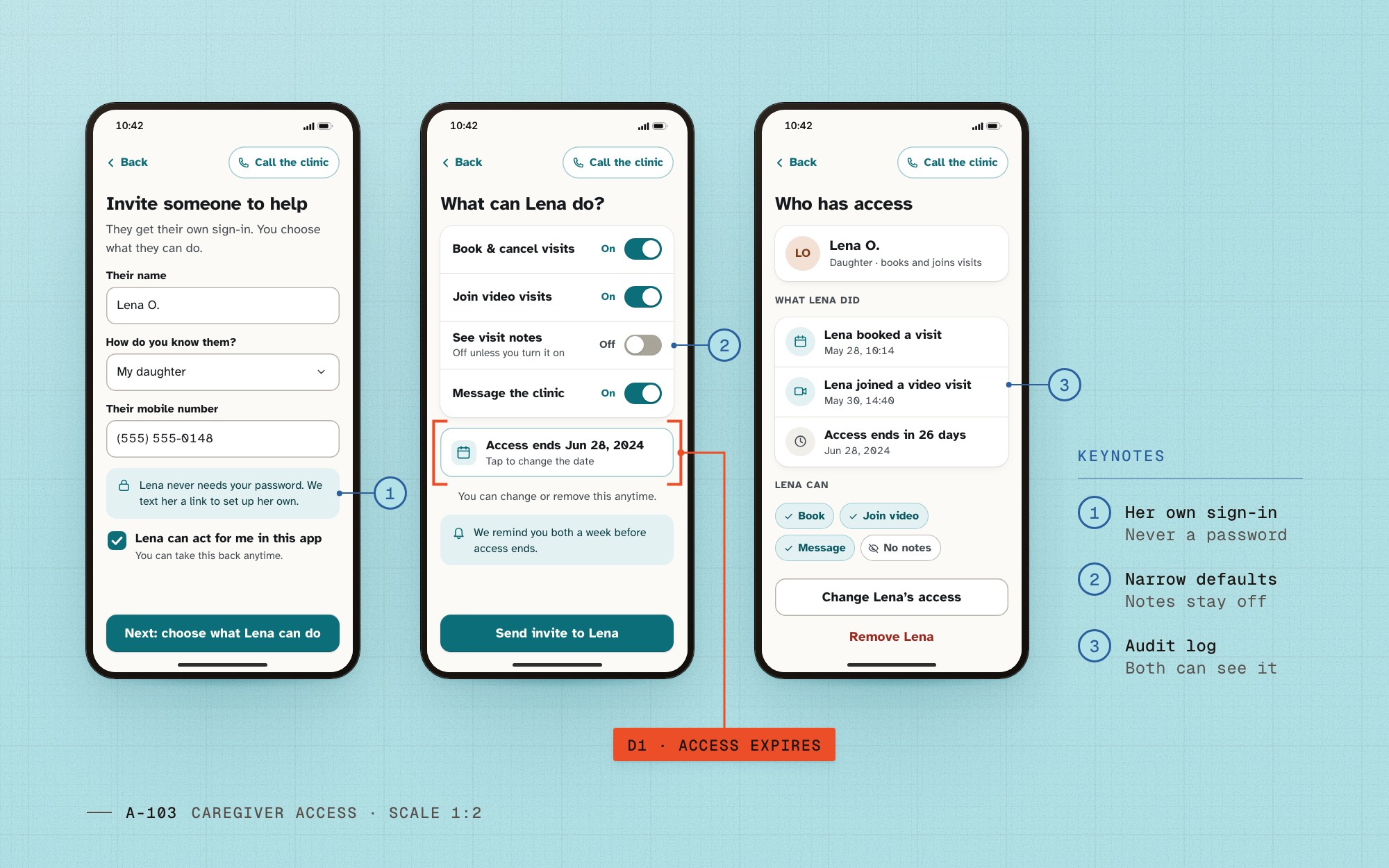
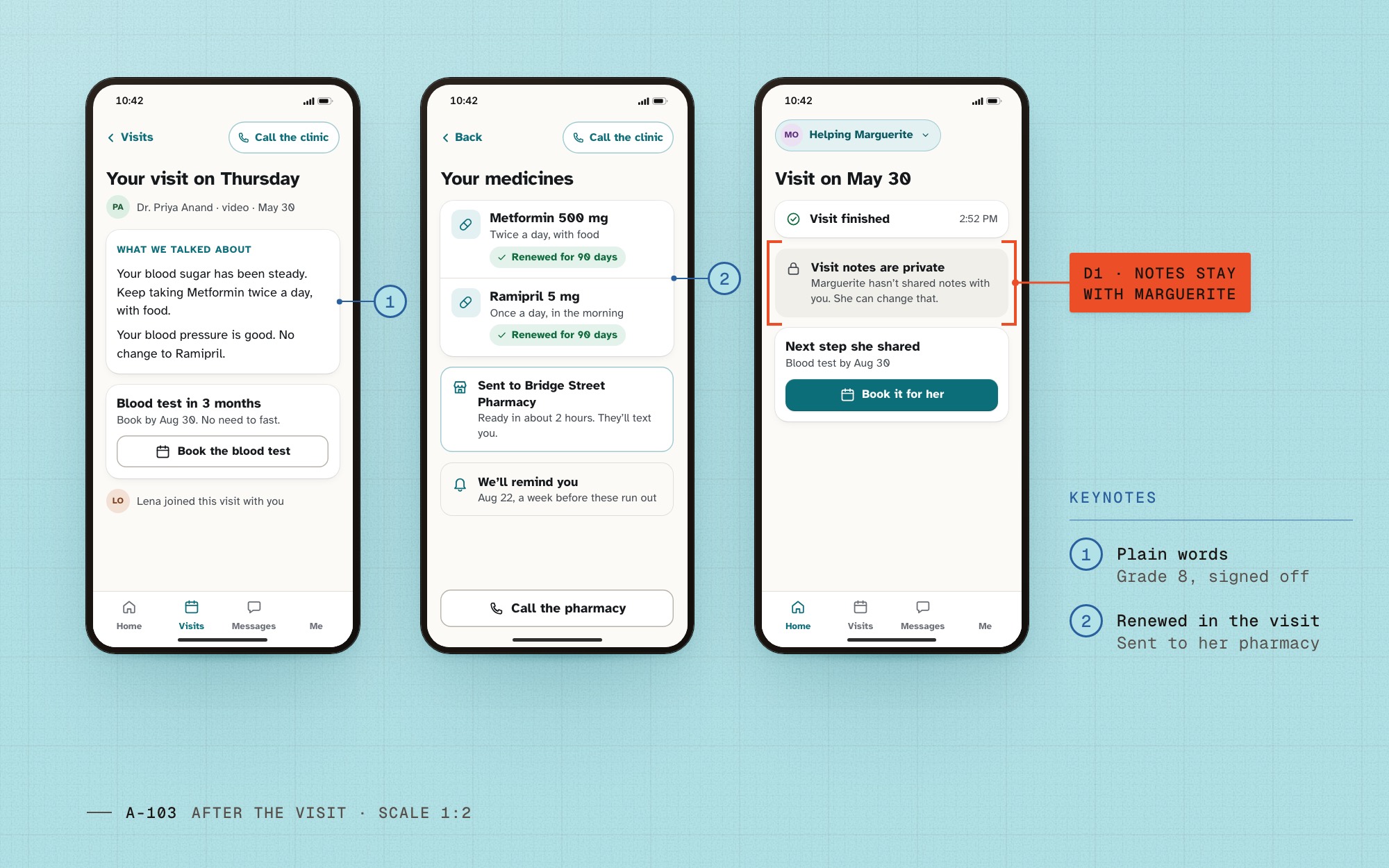
Daughters and sons were already doing the booking and the joining, signed in with their parents’ passwords. So we made the helper a real person in the system: invited by name, with their own sign-in, a short list of things they can do, and an end date.
Both people see the same log of what the helper did. That one screen made the client’s privacy officer comfortable, and it was the screen patients tapped most in testing.
Booking
Lead with today
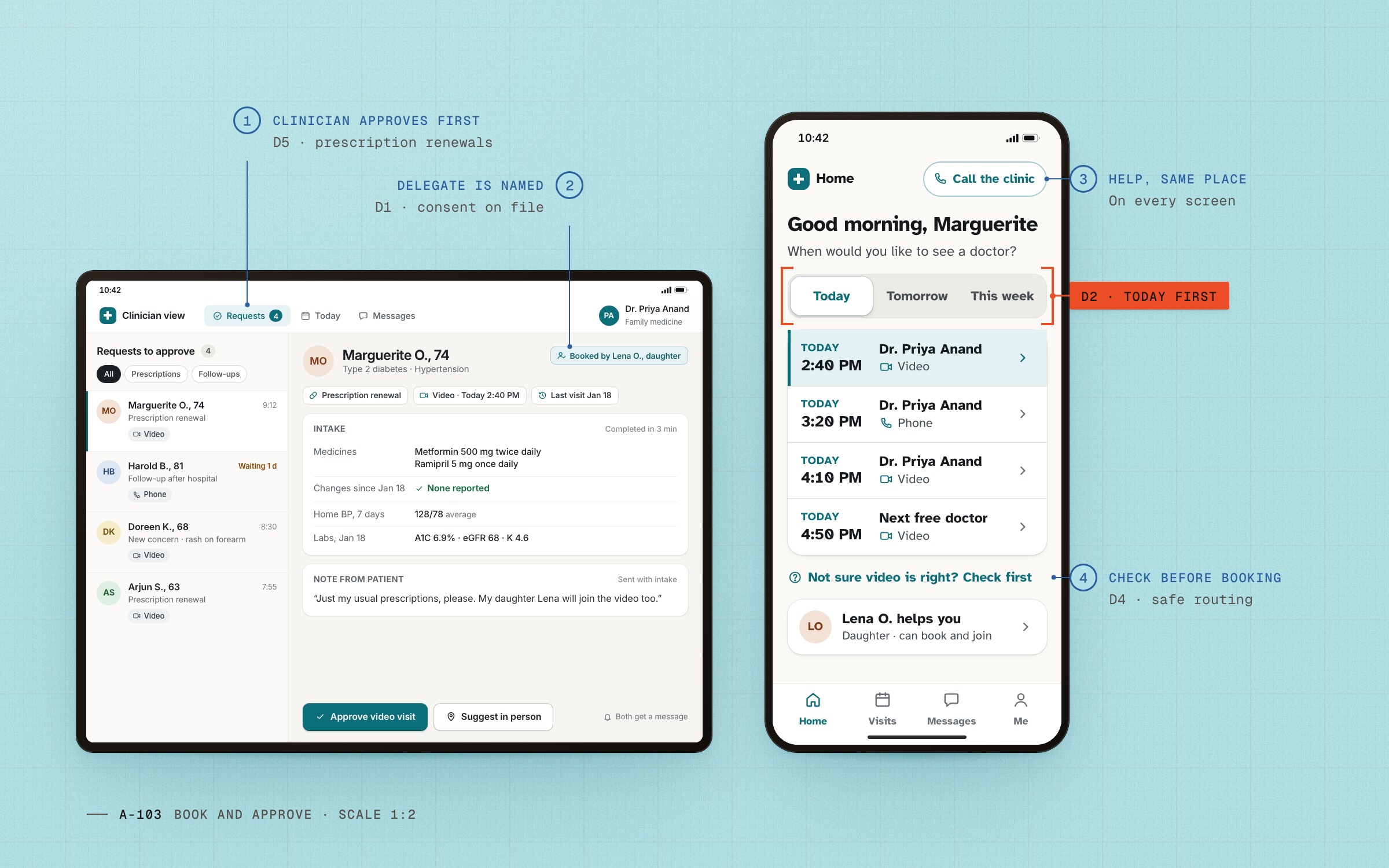
Six months of booking data showed what the month calendar was hiding: most people wanted to be seen today or tomorrow, and almost nobody planned two weeks out.
Booking now opens on Today, with Tomorrow and This week one tap away, and each slot names the doctor and whether it is video or phone.
Fig. 02 D2Booking leads with Today / Tomorrow / This week.
Joining and routing
A way in when video fails
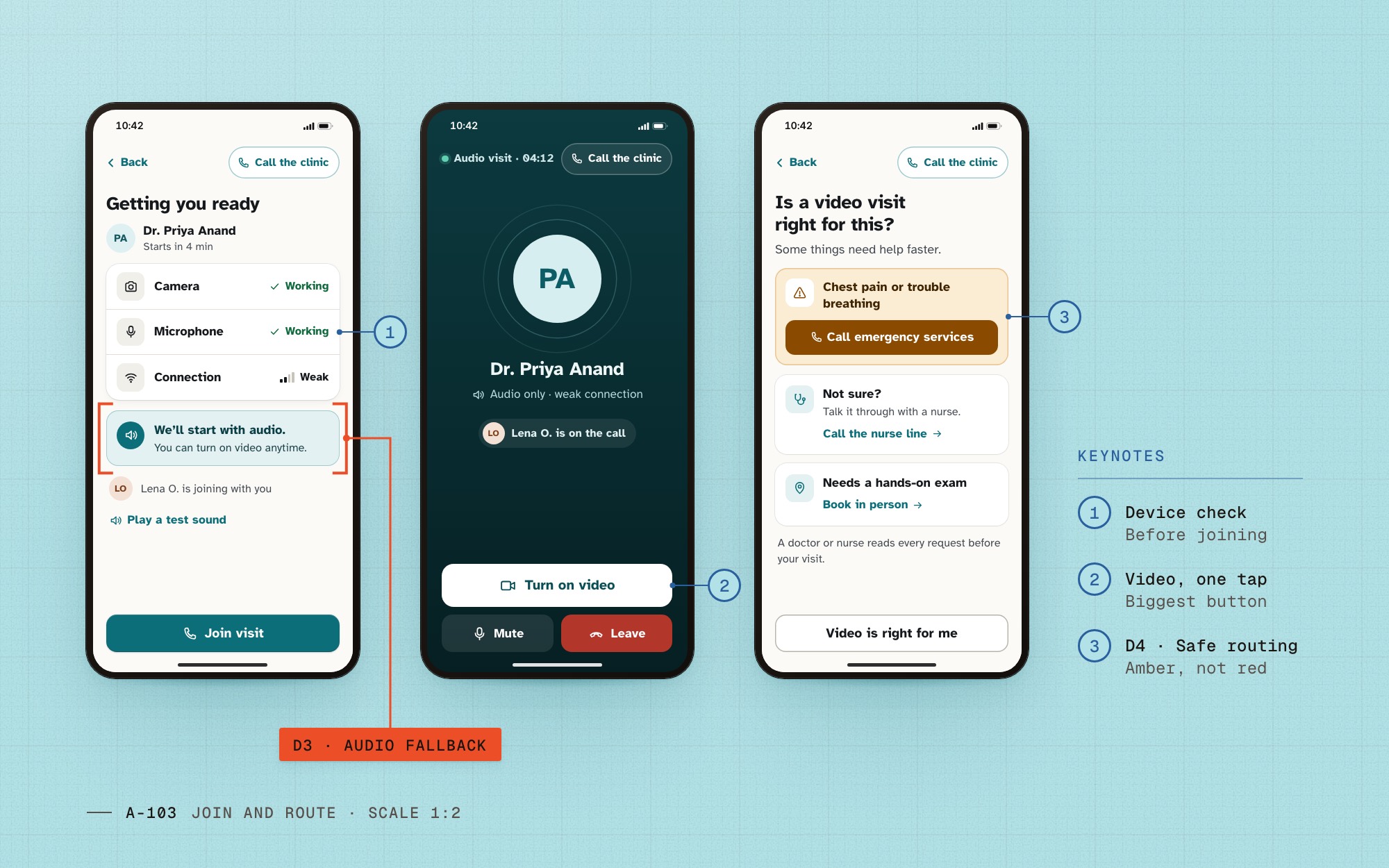
The device check runs before the doctor is waiting. On a weak connection we start with audio and say so in one sentence, with the video button the biggest thing on the call screen.
Before booking, one question asks whether video is right at all. Chest pain goes to emergency services, uncertainty to a nurse line, and hands-on problems to an in-person visit.
Accessibility
Criteria that changed screens
We treated WCAG 2.2 AA as design input from the first sketch. Five of the newer criteria changed screens outright: how people sign in, what intake asks, where help lives, how big targets are, and what the sticky Join bar may cover.
| WCAG 2.2 criterion | Design decision |
|---|---|
| 3.3.8 Accessible Authentication (Minimum) | Passkey or a one-time email link; no puzzles, no memorized passwords |
| 3.3.7 Redundant Entry | Intake prefilled from the profile and last visit; confirm instead of retype |
| 3.2.6 Consistent Help | “Call the clinic” in the same place on every screen |
| 2.5.8 Target Size (Minimum) | 48px targets throughout; 56px for Join |
| 2.4.11 Focus Not Obscured (Minimum) | The sticky Join bar never covers a focused field (scroll padding) |
Five criteria that changed what we drew.
Fig. 04 Each criterion maps to a decision we can point at on screen.
Before / after
Before and after


Key screens
Key screens
01 / 04
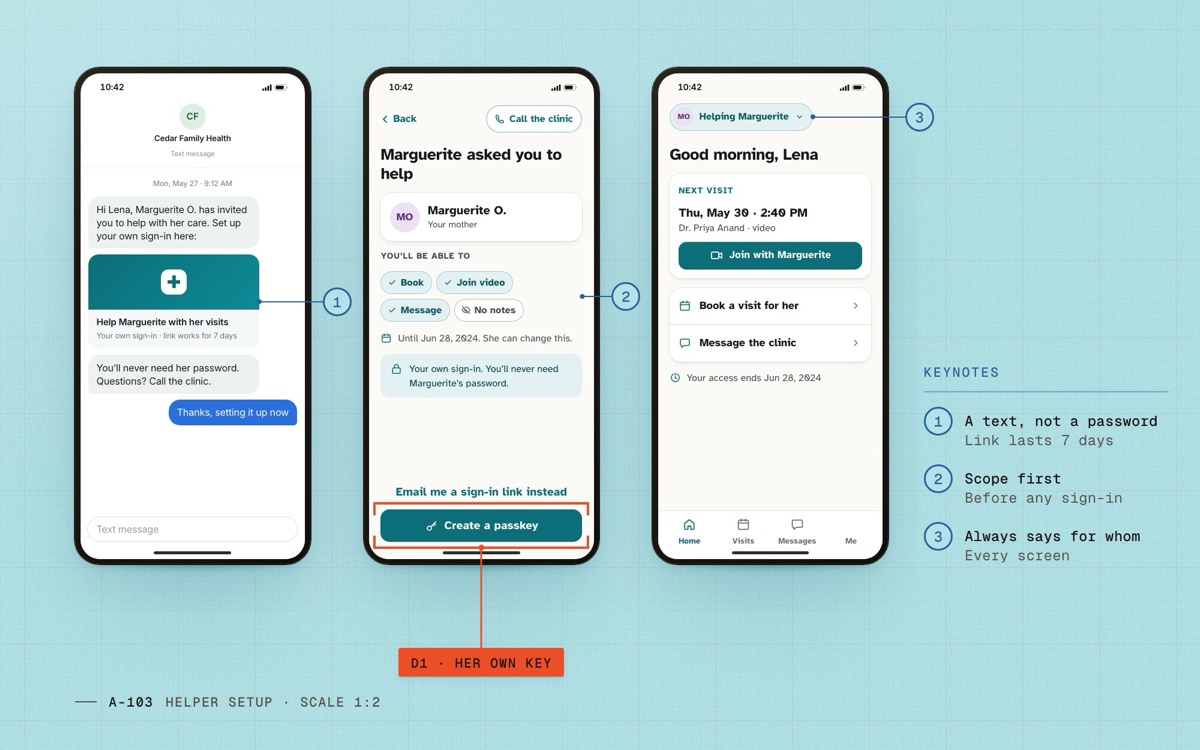
Fig. 06 D1Lena sets up her own key from a text; she sees what she can do before she signs in. 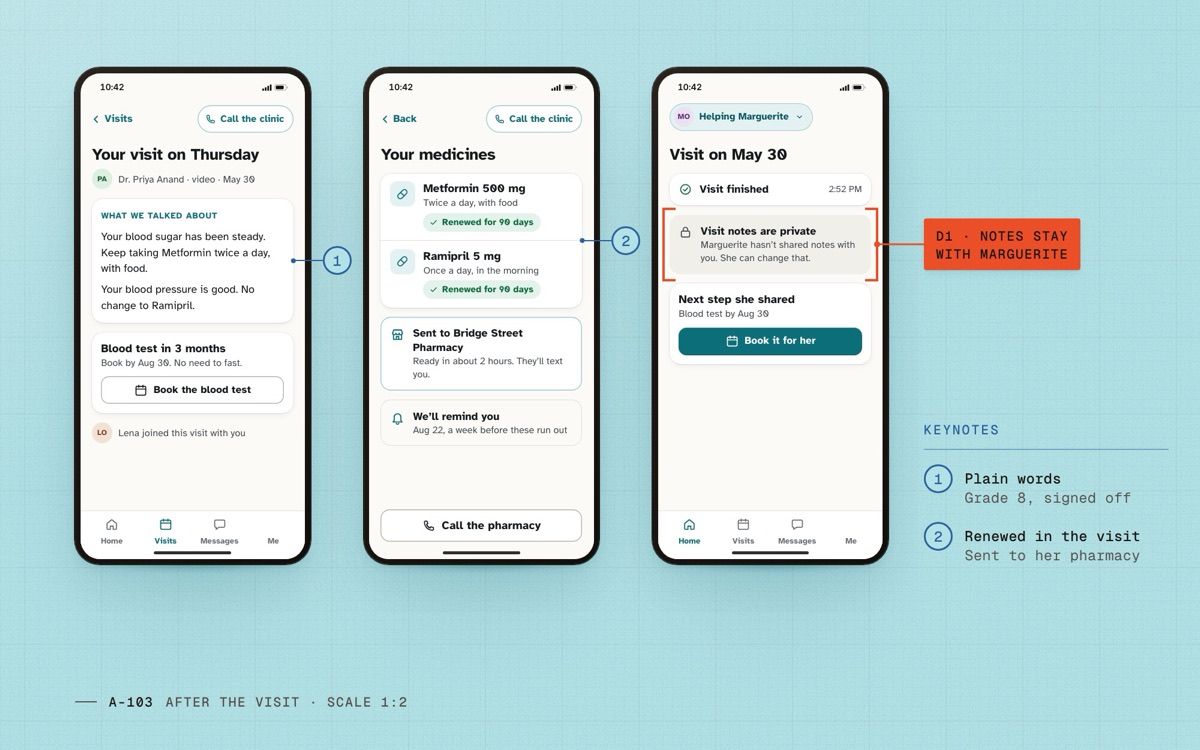
Fig. 07 D1After the visit: plain words for Marguerite, renewals sent to her pharmacy, notes kept from her helper. 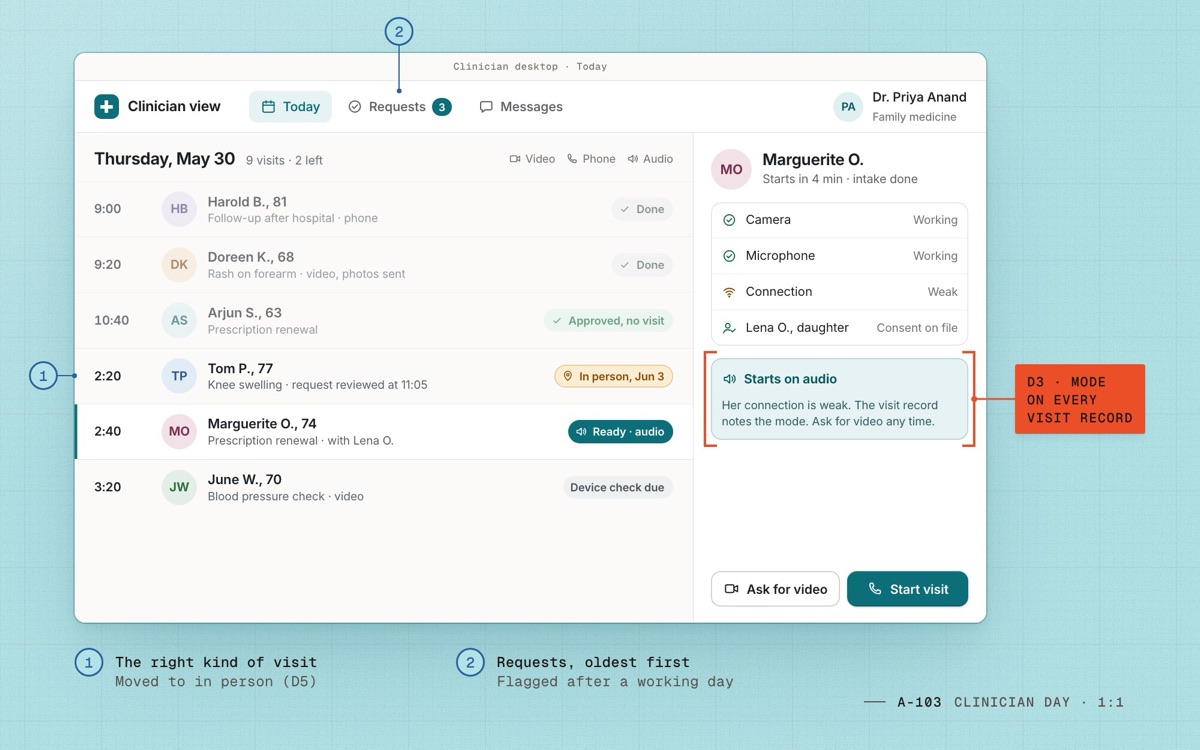
Fig. 08 D3The clinician’s day: every visit shows its mode, and video is one tap away when audio isn’t enough. 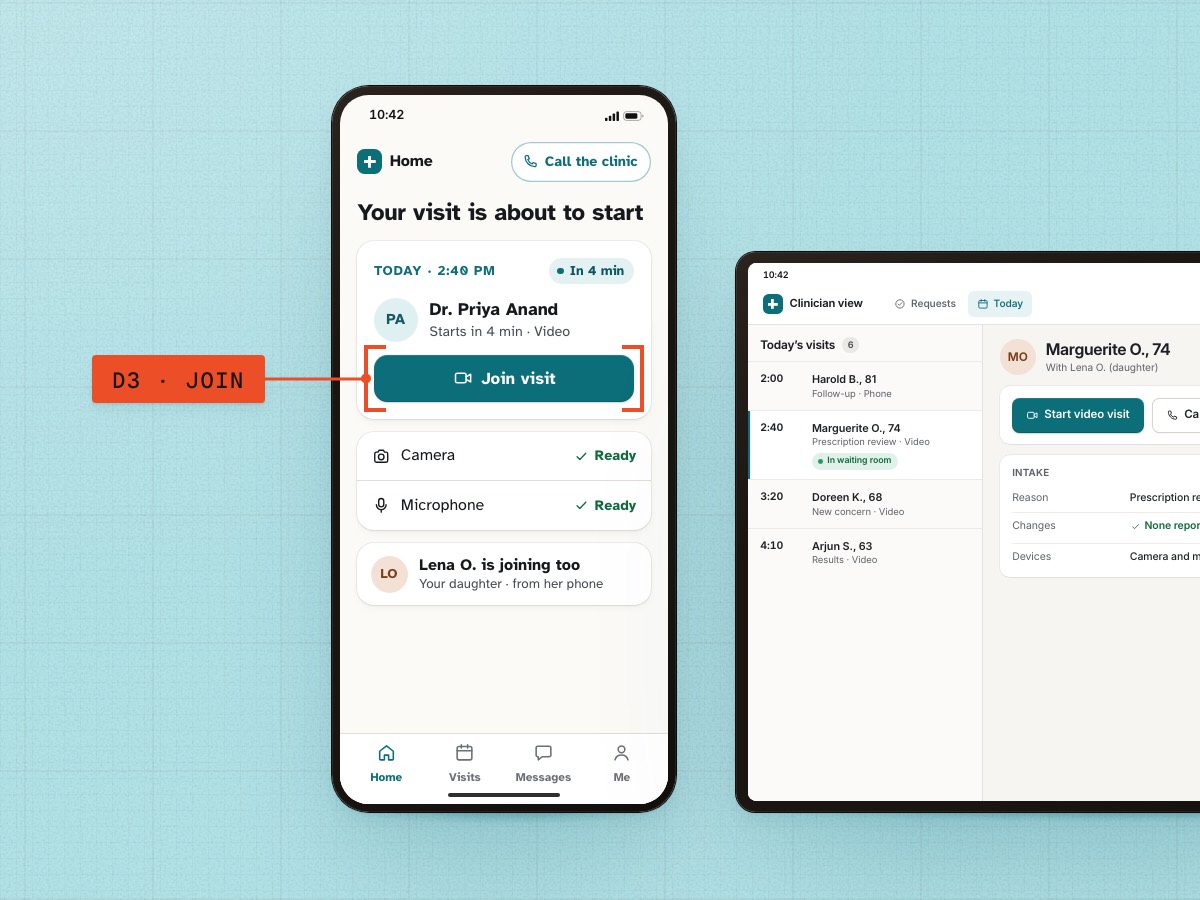
Fig. 09 Join visit, four minutes out, on the patient’s phone.
Design system
A care kit for older eyes and unsteady hands
One accent, an amber that routes without alarming, and type that never drops below 19 px in the patient app.
- #0B6E78
care-primaryPrimary actions, Join, links · 5.97 : 1 with white - #FBFAF7
surfaceWarm off-white background, less glare than pure white - #8A4B00
urgent-routingRouting to emergency services, a nurse line or in person · amber, never alarm red - #15191C
inkBody text · 16.9 : 1 on surface
| Role | Spec | Rendered |
|---|---|---|
| Heading | Atkinson Hyperlegible 700, 28/34 | Good morning, Marguerite |
| Body | Atkinson Hyperlegible 400, 19/28 minimum | Medicines we have on file for you |
| Button | Atkinson Hyperlegible 700, 20/24 · 56 px target | Join visit |
Components
- Join bar
- Permission toggle row
- Consent card
- Help button
Outcomes
After launch
- Launch
2024
- +2 weeks
Join success 97%
Join works across iOS, Android and web; about one visit in nine starts on audio
- +6 weeks
Caregiver-linked 3% → 12%
Helpers invited by name instead of borrowing passwords
- +6 months
No-shows −18%
Fewer missed video visits; caregiver-linked accounts reach 21%
Learnings
Revisions
Paths not taken
- One shared login with a PIN to switch between patient and helper. Faster to build, but consent and the audit log would have been fiction.
- A smarter month calendar. The lead-time data said people think in days, not dates.
- An SMS-only join for older phones. We kept text reminders and sent everyone to the same one-tap join.
Two reflections
- Plain language took more clinical review time than any single screen. Next time I would plan for it from the first week instead of treating it as copy polish.
- Remote sessions on people’s own phones and Wi-Fi found more problems than any lab session. Most of what we fixed in joining came from them.
Go deeper
Details
Detail 1How helper consent works
The patient invites a helper by name and mobile number. The helper gets a text with a link and sets up their own sign-in, a passkey or a one-time email link, never the patient’s password.
Each permission is its own switch with a one-line explanation, and visit notes start off. Access ends on a date the patient picks, 90 days by default, and both people get a reminder a week before.
Clinicians see who acted: “Booked by Lena O. for Marguerite O.” That line, and the shared log, is what the privacy impact assessment signed off on.
Detail 2The appropriateness screen
One question before booking: is a video visit right for this? Three plain answers, written and reviewed by our clinical advisors: chest pain or trouble breathing, call emergency services now; not sure, call the nurse line; needs a hands-on exam, book in person.
Urgent routing uses amber, never alarm red: in testing, red read as an error the patient had made. The urgency is in the words and the size: the emergency answer is a full-width “Call emergency services” button.
Detail 3How we measured it
No-shows: video visits in the six months after launch against the six months before, same clinics.
Intake time: median from the first intake screen to submit, from product analytics. SUS: two rounds of 12 patients aged 60 and over, tested on their own phones.
NoteNames and details changed to protect patient privacy.
Continue the set

